You just imported your FLAC library, and… Apple Music refuses to recognize it. Sound familiar? Or maybe you’re managing a 50,000-track collection and the Music app crawls to a halt. Perhaps you want bit-perfect playback for your expensive DAC but can’t figure out how to bypass macOS’s audio processing.
If you’ve ever faced these frustrations on your Mac, you’re not alone. Apple Music might come pre-installed, but it’s woefully inadequate for serious music collectors and audiophiles. The good news? There are several excellent audio players that blow Apple Music out of the water.
I’ve spent weeks researching the top audio players for macOS, analyzing community feedback from MacRumors, Head-Fi, and audiophile forums, and testing format support, library management, and sound quality. In this guide, I’ll walk you through the six best options, what makes each one special, and help you find the perfect player for your needs.
Before diving into the players, here’s what I evaluated:
Format support: Can it play FLAC, ALAC, DSD, and other lossless formats without converting?
Library management: Does it handle large collections (10,000+ tracks) smoothly with proper tagging and organization?
Sound quality: Does it offer bit-perfect output, exclusive DAC control, and audiophile-grade playback?
macOS integration: Does it feel native, or like a Windows app awkwardly ported over?
Value proposition: Is the price justified by features, or are there better free alternatives?
Now, let’s get to the players.
Best for: Music collectors with large local libraries who want a fast, powerful iTunes alternative
Price: $34.95 (one-time purchase, 30-day free trial)
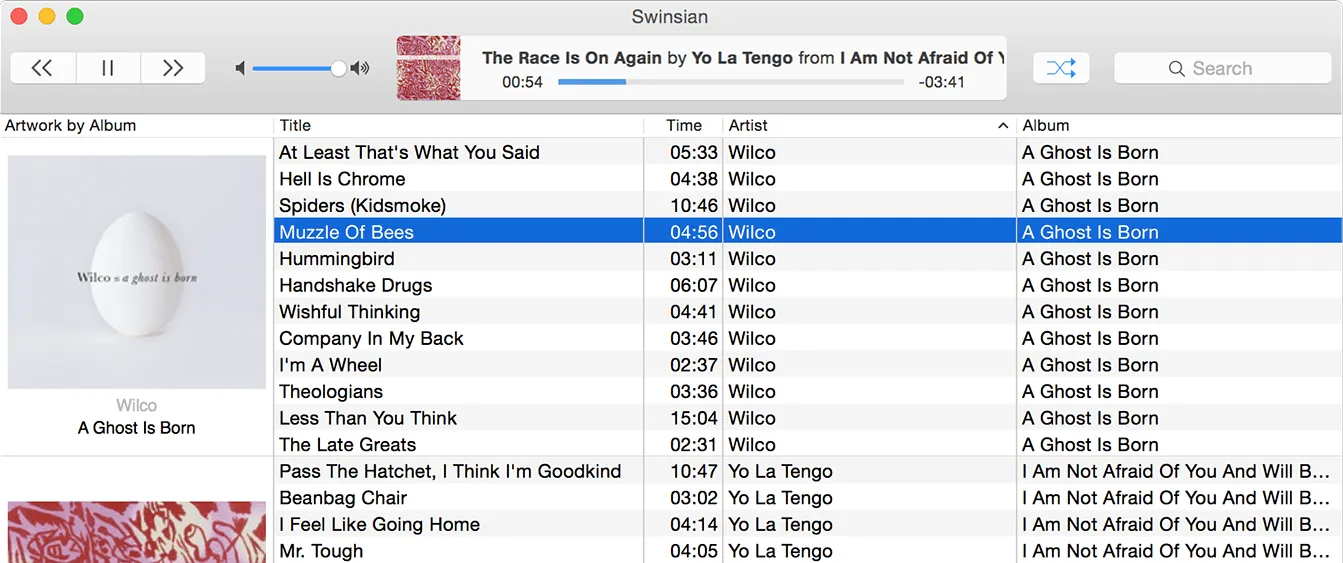
If Apple had continued developing iTunes for music lovers instead of pivoting to streaming, it would look like Swinsian. This Mac-native player is built specifically for people who own their music, offering lightning-fast performance, advanced tagging, and a customizable interface that feels like classic iTunes without the bloat.
What makes Swinsian special:
The performance is simply outstanding. Users with 100,000+ track libraries report Swinsian loads in seconds and handles searches instantly. One user with a 3TB library noted it boots in just 7 seconds. Compare that to Apple Music, which can take minutes to index large collections and often becomes sluggish.
Tag editing is where Swinsian truly shines. You can edit multiple tracks simultaneously using regular expressions for find-and-replace operations. Classical music lovers will appreciate expanded tagging support for Movement, Work, Original Release Date, Barcode, and Lyricist fields. The duplicate finder helps you clean up your library with flexible matching criteria.
Swinsian 3 (released in 2025) brings native Apple Silicon support and finally adds dark mode—a long-requested feature. It also includes ReplayGain/SoundCheck volume normalization, custom sort fields, and a redesigned playback queue. The folder browser lets you view your library structure if you’ve manually organized your files.
Where Swinsian falls short:
It’s focused entirely on local files—no streaming service integration. If you use Spotify, Tidal, or Qobuz, you’ll need separate apps. There’s also no built-in device sync; you’ll still need the Finder or Apple Music to transfer music to an iPhone or iPad.
At $34.95, it’s pricier than some alternatives, though the 30-day trial lets you test it thoroughly. Swinsian 3 is a paid upgrade from version 2, but existing users get a 40% discount.
The verdict: For anyone with a serious local music collection, Swinsian is the gold standard. It’s what iTunes should have become—fast, powerful, and focused on music management without the bloat of streaming services and social features.
Website: https://swinsian.com/
Best for: Audiophiles who demand the absolute best sound quality and want streaming integration
Price: Studio: $5.90/month or $69.99/year | Origin: $119.90-$149.99 (one-time purchase)
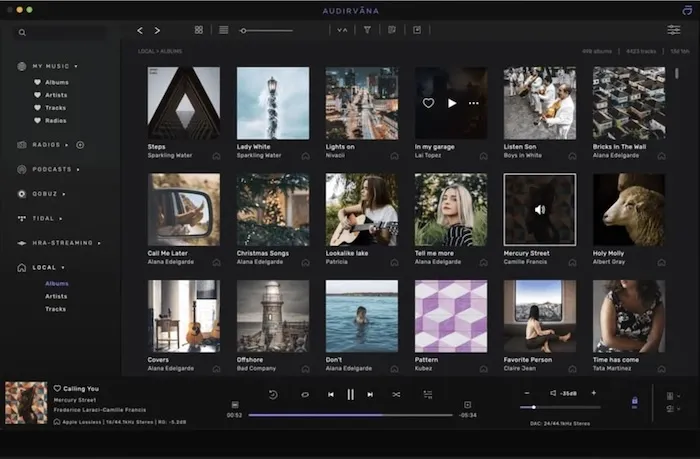
Audirvāna is for listeners who care deeply about sound quality. It takes exclusive control of your DAC, bypasses macOS’s audio processing for bit-perfect output, and offers extensive DSP options including upsampling, filters, and plugin support. If you’ve invested in high-end audio gear, this is the player that’ll make the most of it.
What makes Audirvāna special:
The sound quality is exceptional. Audirvāna users on Head-Fi and Audiophile Style forums consistently describe it as “the best sounding” Mac player. It achieves this through exclusive DAC access (preventing other apps from interfering with audio output), automatic sample rate switching to match your files, and advanced audio processing options.
You get two versions: Audirvāna Studio integrates Qobuz and TIDAL streaming alongside your local library, while Audirvāna Origin is a one-time purchase focused purely on local files. Both share the same audio engine and sound quality.
The DSP capabilities are impressive. You can upsample files, apply Audio Unit plugins, adjust EQ settings, and fine-tune playback for your specific equipment. There’s even a headless Linux Core for NAS/server deployments, and a free Remote app for iOS and Android.
Where Audirvāna falls short:
The learning curve is steep. Audirvāna offers so many settings and configuration options that beginners can feel overwhelmed. Multiple users report that “getting there is the showstopper”—the sound quality is impressive, but the user experience isn’t as polished as competitors.
The pricing is also a consideration. Studio requires an ongoing subscription, which adds up over time. Origin’s $119.90-$149.99 price is steep compared to free alternatives, though audiophiles argue the sound quality difference justifies the cost.
Some users report occasional bugs and stability issues, particularly when updating macOS versions or connecting new DACs.
The verdict: If sound quality is your absolute priority and you’re willing to invest time in configuration, Audirvāna delivers. Studio is ideal if you want streaming integration; Origin is perfect for purists with local-only libraries. For casual listeners, the complexity and cost may not be justified.
Website: https://audirvana.com/
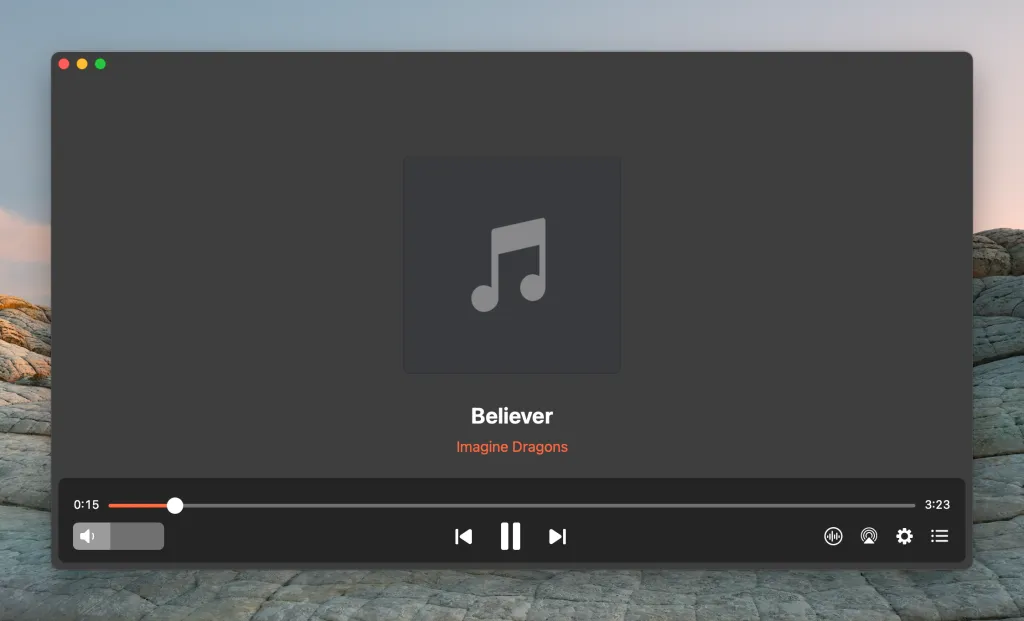
Best for: Mac users who want a reliable player for high-quality music and video playback with built-in streaming support
Price: Free; Elmedia Player PRO – $19.95 (one-time purchase)
Elmedia Player is a versatile media player built specifically for macOS. While it’s best known for video playback, it also serves as an excellent music player for local audio collections. With support for a wide range of audio formats and powerful playback features, it gives you full control over your listening experience.
Whether you’re playing MP3, FLAC, AAC, WAV, or high-resolution ALAC files, Elmedia Player delivers smooth, high-quality playback without requiring additional codecs, plugins, or file conversions.
What makes Elmedia Player special:
Elmedia Player handles virtually any audio format out of the box, including MP3, FLAC, ALAC, AAC, WAV, AIFF, and OGG. There’s no need to install additional codecs or convert files, making it a convenient choice for users with diverse music collections.
Unlike many dedicated music players, Elmedia combines audio and video playback in a single app. This is especially useful if you regularly switch between listening to music and watching videos, as you can manage both from one interface.
Playback is highly flexible. The built-in equalizer with ready-made presets makes it easy to fine-tune the sound, while advanced audio settings and support for Dolby and DTS deliver a richer, more immersive listening experience. You can also create and manage playlists, rewind your favorite parts of tracks, and adjust volume levels for more consistent playback.
Another standout feature is wireless streaming. Elmedia Player lets you stream audio and video from your Mac to Apple TV, Chromecast, Roku, Smart TVs, and DLNA-compatible devices, making it easy to enjoy your music through larger speakers or home entertainment systems without additional software. Playing music in Elmedia Player is completely free and available to all users by default, while wireless streaming to external devices is available as a PRO feature.
Where Elmedia Player falls short:
Elmedia Player is primarily a video player that also offers solid music playback capabilities. However, users with large music collections may miss advanced library management features such as automatic cataloging, smart playlists, deep tagging tools, and detailed metadata editing that are commonly found in dedicated music applications.
In addition, some advanced features are only available in the PRO version, so upgrading may be necessary to unlock the full experience.
The verdict: Elmedia Player is an excellent choice for Mac users who want a versatile player for both audio and video. Its broad format support, smooth performance, advanced audio features, and wireless streaming capabilities make it particularly appealing for listening to local music collections.
Website: https://www.elmedia-video-player.com/
Before you organize your library, you need to find it. FileMinutes lets you search for MP3, FLAC, and other audio files across your Mac instantly. Filter by file type, search inside specific folders, and browse results with arrow keys.
Best for: Mac users who want a beautiful, native, free player for both audio and video
Price: Free (open-source)
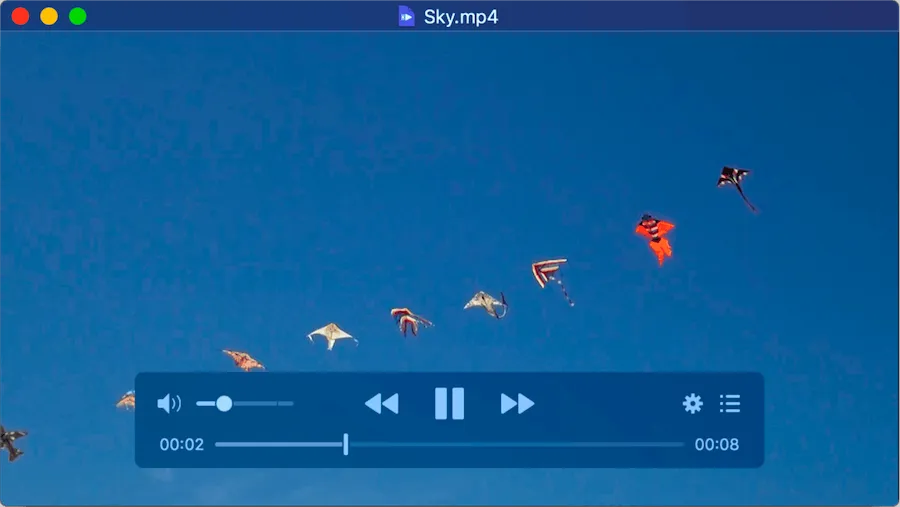
IINA is what happens when someone builds a media player specifically for macOS in 2026. Written entirely in Swift, it feels like a true Mac app with Dark Mode, Touch Bar controls, trackpad gestures, and Picture-in-Picture support. Under the hood, it uses the powerful mpv engine, meaning it handles virtually any format you throw at it.
What makes IINA special:
The native macOS experience is unmatched among free players. IINA supports all the modern Mac features you’d expect: smooth animations, trackpad gestures for volume and seeking, Touch Bar integration, and automatic switching to Music Mode when you play audio files.
The interface is clean and uncluttered. Controls appear in a semi-transparent overlay on your content and fade when not needed. Hover over the timeline for thumbnail previews. The Music Mode presents a minimal but elegant UI focused on audio playback with album art and track information.
Format support is excellent thanks to the mpv engine. IINA plays FLAC, ALAC, MP3, AAC, WAV, AIFF, Ogg Vorbis, Opus, and many more formats without requiring codec packs or conversion. It handles playlists well, supports folders, and can scan directories recursively.
The plugin system (introduced in version 1.4.0) allows you to extend functionality with JavaScript, controlling playback, accessing the mpv API, adding UI elements, and more.
Where IINA falls short:
IINA isn’t a dedicated music library manager. There’s no automatic library scanning, advanced tagging, or smart playlists like you get with Swinsian. It’s best for playing files and folders rather than managing large collections.
Some music-specific features are limited in Music Mode—for example, playlist and chapter panels don’t work properly, and you can’t sort by custom fields. These are feature requests in progress but not yet implemented.
For hardcore audiophiles, IINA lacks exclusive DAC mode and bit-perfect output controls found in Audirvāna.
The verdict: IINA is the best free all-rounder for Mac users. It’s perfect if you want a capable player for your music files without library management complexity, or if you also watch videos and want one app for both. Choose it over VLC—IINA is simply better optimized for macOS.
Website: https://iina.io/
Best for: Users who want hi-res audio playback and unlimited cloud storage for their library
Price: Free (basic) | Premium: $4.99/month or $49.99/year
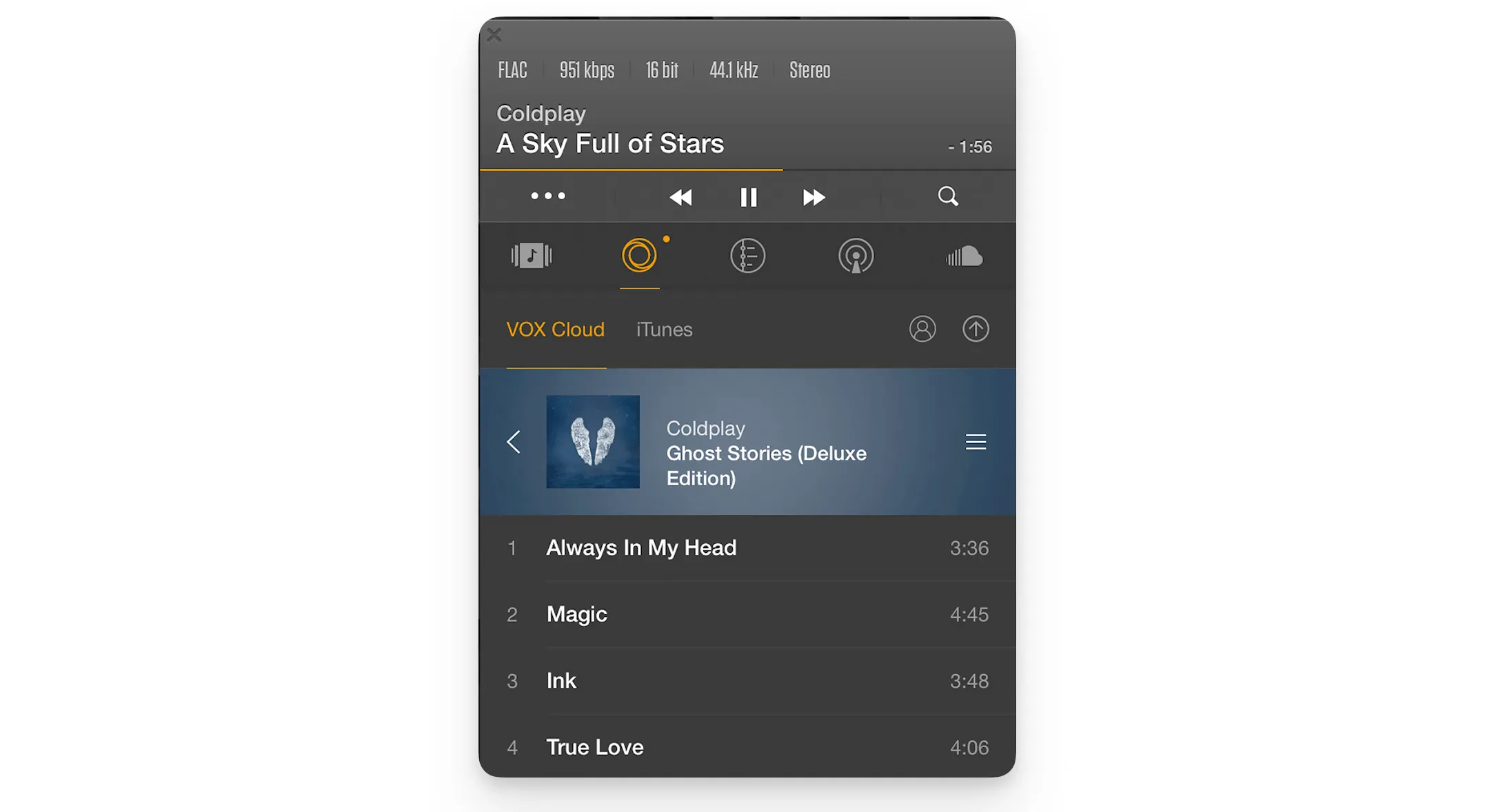
VOX markets itself as the “#1 Hi-Res audio player for Mac & iPhone,” offering 24-bit/192kHz playback, extensive format support, and unlimited cloud storage for your music library. The free version is functional, but most features require the Premium subscription.
What makes VOX special:
The hi-res audio support is genuine. VOX’s BASS Audio Engine handles FLAC, ALAC, DSD, WAV, AIFF, and more, with playback up to 24-bit/192kHz—four times higher resolution than CD quality. It supports 5.1 multichannel audio and includes advanced audio settings.
VOX Cloud is the standout feature for Premium users: upload unlimited music (regardless of size and format), and it won’t compress your files. Stream in original quality to Mac, iPhone, and Windows devices (up to 5 devices). This is ideal if you want access to your FLAC library everywhere without carrying files locally.
Premium also includes a 10-band equalizer with over 30 presets, access to 30,000+ internet radio stations, and cross-device library synchronization.
Where VOX falls short:
Reliability issues are a major concern. Multiple users report serious problems: cloud uploads failing with no error messages, “loading library” getting stuck forever, songs greying out and becoming unplayable, and scrambled playlists. One user’s entire library stopped playing after a year, and support went silent.
The free version is quite limited. Advanced features like the equalizer, gapless playback, and cloud storage are locked behind the Premium paywall at $4.99/month. That adds up to $60/year—more expensive than Audirvāna Studio’s annual plan.
Music management is basic. You can’t edit metadata, add album art, or organize your library effectively. If a file uploads without art, it might show the wrong album cover with no way to fix it.
The verdict: VOX has potential with its hi-res support and cloud features, but reliability problems make it hard to recommend over more stable alternatives. If cloud streaming is essential, consider it with caution and thoroughly test during a trial period. For local playback only, IINA or Swinsian are better choices.
Website: https://vox.rocks/
Best for: Budget-conscious audiophiles who want hi-res playback and DSD support without paying
Price: Free (Pine Player Pro available with additional features)
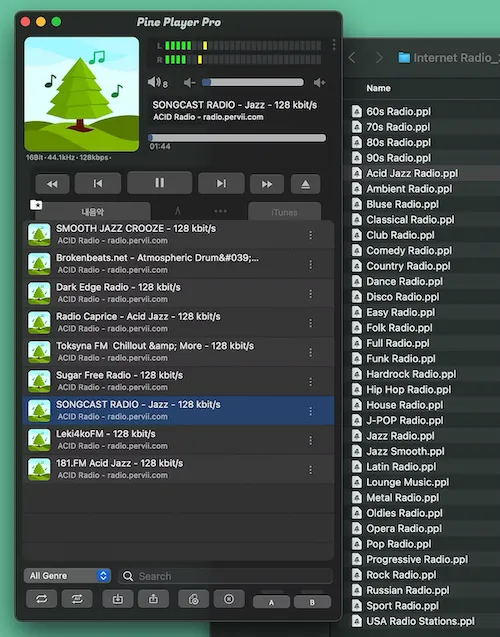
Pine Player is the best-kept secret among Mac audiophiles. It’s completely free, supports formats up to 32-bit/768kHz including DSD and SACD ISO files, offers upsampling and a 12-band EQ, and delivers sound quality that users compare favorably to Audirvāna at a fraction of the cost (free vs. $120+).
What makes Pine Player special:
The format support is exceptional. Pine Player handles everything: MP3, FLAC, APE, AAC, M4A, WAV, AIFF, OGG, WMA, DSD (DSF, DFF), SACD ISO, and OPUS. It’s one of the few free players that properly supports DSD Native (DoP) and SACD ISO files—formats that typically require expensive software.
The upsampling technology is the standout feature. Pine Player’s Over Sampling Filter can upconvert ordinary MP3 files to 32-bit/768kHz and send them to your DAC for optimal playback. Even native hi-res files (MQS, DSD) can be upsampled to 768kHz, potentially improving playback quality depending on your DAC.
Gapless playback and crossfade work flawlessly, ideal for live albums and DJ mixes. The 12-band equalizer includes presets that noticeably enhance audio without destroying the original sound character. CUE sheet support handles albums split into tracks.
Users on audiophile forums describe it as “the best sounding music player I encountered” and note that “Audirvāna is perhaps slightly better but at 6-7 times the price!”
Where Pine Player falls short:
Library management is minimal. Pine Player is designed for playing files and folders, not organizing massive collections with smart playlists and advanced tagging like Swinsian offers.
There are occasional bugs. Some users report sporadic dropouts that require settings adjustments, and the EQ annoyingly defaults to “On” every time you start the app (though this may be fixed in newer versions).
The interface is functional but not as polished as paid alternatives. It gets the job done but won’t win design awards.
Pine Player Pro (paid version) adds DSD format conversion and advanced editing features, but the free version is already impressively capable.
The verdict: Pine Player is an outstanding value. If you’re an audiophile on a budget or want to experiment with hi-res audio and DSD files without spending $100+, Pine Player delivers. It won’t replace a dedicated library manager, but for playback quality at zero cost, it’s unbeatable.
Website: https://www.pine-player.com/
While the top 6 cover most needs, here are other players that excel in specific areas:
Apple Music (included with macOS) - Best for those staying in Apple’s ecosystem with iCloud library sync and Apple Music streaming. Supports Lossless/Hi-Res Lossless but no native FLAC.
Colibri ($19.99) - Lightweight, bit-perfect FLAC player with minimal CPU usage and exclusive/Hog mode. Great for simple, focused playback.
Doppler ($25) - Beautiful, modern player with Mac/iOS sync. Perfect for Bandcamp purchases and file owners who value aesthetics.
Roon ($14.99/month or $149.88/year or $829 lifetime) - Best for whole-home multiroom setups with rich metadata linking and powerful DSP. Requires dedicated Core server.
foobar2000 (free) - Highly customizable open-source player with component ecosystem. Fewer Mac-specific add-ons than Windows version.
Strawberry (free, but Mac builds require $7/month sponsorship) - Open-source library manager with smart playlists, tag editing, and bit-perfect playback on Linux.
VLC (free) - Universal media player that handles any format. Better on Mac to use IINA instead for native experience.
Here’s how these players stack up side-by-side:
| Feature | Swinsian | Audirvāna | Elmedia Player | IINA | VOX | Pine Player |
|---|---|---|---|---|---|---|
| Price | $34.95 | Studio: $5.90/mo Origin: $119.90-$149.99 | Free/PRO $19.95 | Free | Free/$4.99/mo | Free |
| macOS native | Excellent | Good | Excellent | Excellent | Fair | Fair |
| Library management | Excellent | Good | Basic | Basic | Basic | Minimal |
| Format support | Excellent | Excellent | Excellent | Excellent | Excellent | Excellent |
| DSD/SACD support | No | Yes | No | No | Yes | Yes |
| Bit-perfect output | Basic | Excellent | No | No | No | Yes |
| Streaming services | No | Yes (Studio) | No | No | No | No |
| Cloud storage | No | No | No | No | Yes (Premium) | No |
| Best for | Library mgmt | Audiophiles | Audio + video | Free all-rounder | Cloud streaming | Free hi-res |
Choose Swinsian if: You have a large local music library (5,000+ tracks) and want the best iTunes replacement with powerful tagging, fast performance, and excellent organization tools. Worth every penny of the $34.95.
Choose Audirvāna if: Sound quality is your absolute priority, you own high-end audio equipment, and you want exclusive DAC control, bit-perfect playback, and optional streaming integration. Studio for streaming, Origin for local-only.
Choose Elmedia Player if: You want one versatile app for both audio and video, with broad format support and wireless streaming to Apple TV, Chromecast, Roku, and other devices. Free for music playback, with PRO ($19.95) unlocking streaming.
Choose IINA if: You want a free, beautiful, Mac-native player for both music and video without library management complexity. It’s the best free option for macOS users—skip VLC and use IINA instead.
Choose VOX if: You need unlimited cloud storage for your music library and want to stream hi-res audio across devices. Be aware of reliability concerns and test thoroughly before committing to Premium.
Choose Pine Player if: You’re an audiophile on a budget who wants DSD support, upsampling to 768kHz, and hi-res playback without spending money. It’s free and sounds exceptional.
Apple Music ships with every Mac, but for serious music collectors, it’s time to move on. It doesn’t support FLAC natively (you must convert to ALAC), offers no true bit-perfect/exclusive mode for audiophile playback, has limited advanced tagging and metadata editing, and becomes sluggish with very large local libraries.
Apple Music is fine if you stream exclusively and stay within Apple’s ecosystem. But for local FLAC collections, advanced tagging, or audiophile-grade playback, any of the six players above is vastly superior.
Will these players slow down my Mac?
No. All six are optimized for macOS and use minimal resources. Swinsian and IINA are particularly lightweight. Audirvāna can use more CPU during upsampling/DSP operations, but it’s designed to prioritize audio processing.
Are they safe?
Yes, when downloaded from official websites. IINA and Pine Player are open-source with public code. Always download from the official links provided in this article.
Do they work on Apple Silicon Macs?
Absolutely. All six players are fully compatible with M1, M2, M3, and M4 Macs and take advantage of Apple Silicon’s performance. Swinsian 3 specifically added native Apple Silicon support in 2025.
Can I set one as my default player?
Yes. Right-click any audio file, choose “Get Info,” select your preferred player under “Open with,” then click “Change All.”
Which one handles FLAC best?
All six handle FLAC excellently. For library management with FLAC, choose Swinsian. For bit-perfect FLAC playback, choose Audirvāna or Pine Player. For simple FLAC listening, IINA works great.
Which player has the best sound quality?
Audirvāna is widely considered the best for pure sound quality, offering exclusive DAC mode and advanced DSP. Pine Player is a close second and completely free. For most listeners with standard equipment, the difference between players is minimal—focus on library features instead.
Can I use these with external DACs?
Yes. Audirvāna and Pine Player specifically support high-end DACs with exclusive mode and automatic sample rate switching. IINA, Swinsian, and VOX work with DACs but don’t offer bit-perfect/exclusive control.
Which player is best for classical music?
Swinsian, with expanded tagging for Movement, Work, Composer, and other classical-specific fields. Roon (not in top 6) is also excellent for classical with its composition-focused metadata linking.
You don’t have to settle for Apple Music’s limitations. Whether you choose Swinsian’s organization, Audirvāna’s sound quality, IINA’s elegance, VOX’s cloud features, or Pine Player’s value, you’ll have a dramatically better music listening experience on your Mac.
My recommendation for most people? Start with IINA if you want free and versatile. If you have a serious music collection, invest in Swinsian—it’s worth every dollar. Audiophiles should try Pine Player first (it’s free!), and upgrade to Audirvāna only if you need the extra features and streaming integration.
The best part? These are all actively maintained and updated for the latest macOS versions, so whichever you choose, you’re in good hands.
Happy listening!